
- Published on
How I Ship Production Features with AI Agents (Not Just LinkedIn post or Promotion PoC Demos)
- Authors
- Name
- Petros Savvakis
- @PetrosSavvakis
How I Ship Production Features with AI Agents (Not Just LinkedIn post or Promotion PoC Demos)
Agentic coding, harness, vibe coding, AI teammates... and more. Those are only some of the "cool" keywords that come up in 2026's engineering space. All that is cool and it means new things to try, experiment, and tinker with... but what does it really work like, at least from what I have tried in my case, across personal projects and independent collaborations?
Let's first do a step back and tell you that for the last few months I am just an orchestrator and mostly a code reviewer. I rarely write a full script of code as I did in the past. The most common time that I need to write code is going into CAVEMAN MODE = ON (I first heard this term from Charlie Holtz - Conductor CEO via Conductor's manual mode) and we adopted it. It's the time when we must do manual typing for quick file edits (like config or .env files) when an AI model struggles to complete the task or you don't want to expose .env values to agents.
With all that in mind, let's stop the jargon and deep dive into what seems to get real results. For the last months, across personal projects and independent collaborations, we've been shipping features like crazy (that are truly working and are fully tested not just vibe coded running in localhost, but in production serving real users). In order to do that, you have to make a legit pipeline that acts like PID Adaptive Control (for those of you that are electrical engineers, you know what I mean) a system that is self-calibrated and can generate stable and real production results. Enough said, let's move to the architecture of it.
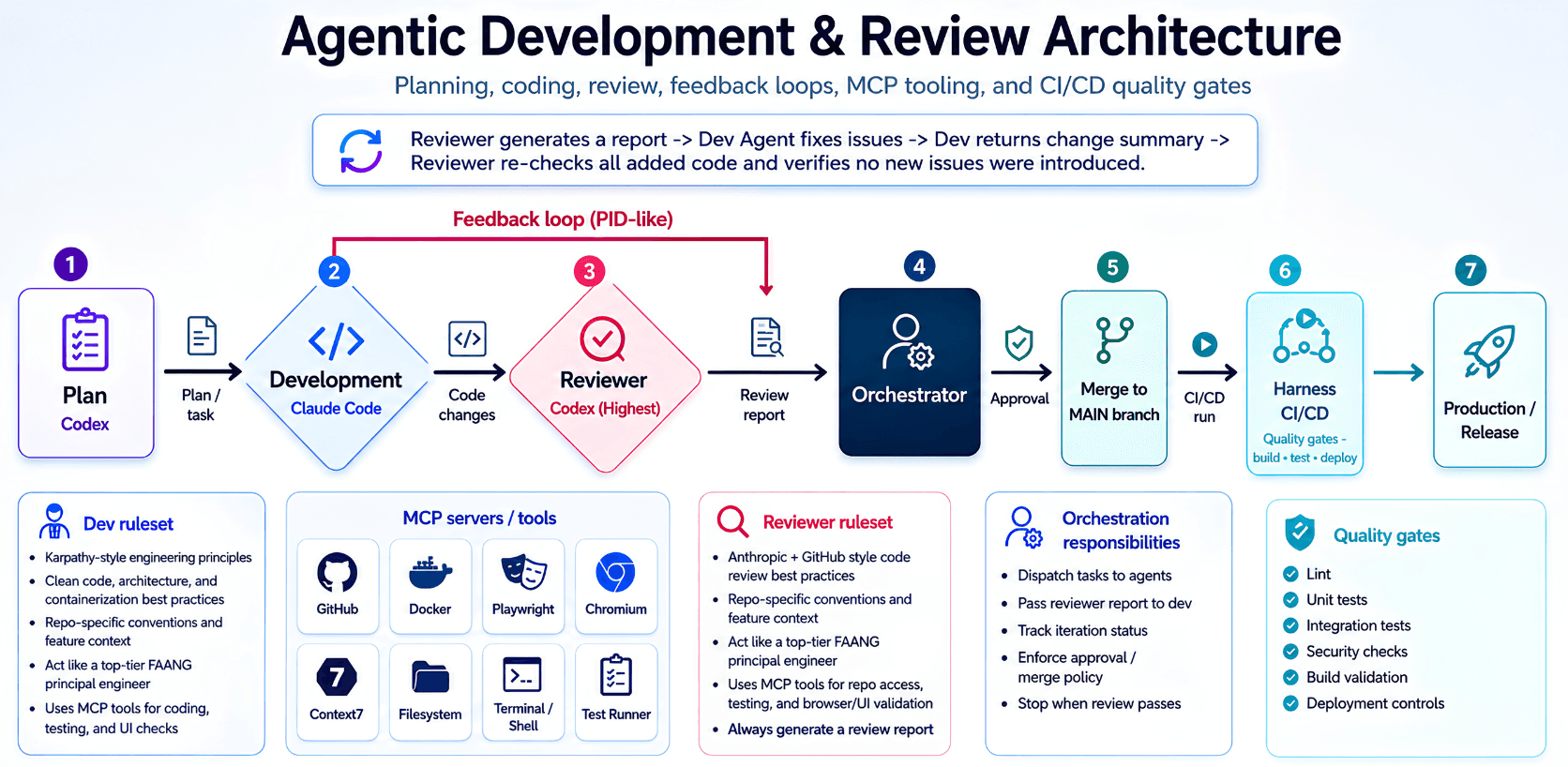
The Workflow: One Human Orchestrator, Three Terminals, One Controlled Loop
Here is the system that has been working for me.
I do not open one agent, throw a vague prompt at it, and hope that something useful comes out at the end. That is the fastest way to get a very convincing demo, a large diff, and a future production incident.
For every meaningful feature, I start by making the problem extremely concrete.
What are we building? Who is using it? What can break? Which API contracts, database models, conventions, security rules, performance constraints, deployment requirements, and existing architectural decisions must remain intact? (Basically acting like product owner and tech lead.)
The more ambiguous the task is, the more work happens before any code is generated—and this is the most crucial part. If something is not clear, then Garbage In, Garbage Out...
The plan is not "add feature XYZ". The plan is closer to:
- Which modules will change and how
- Which data models and endpoints are affected
- Which existing flows could regress
- Which migrations, feature flags, permissions, tests, or telemetry are required
- What the acceptance criteria look like before implementation starts
- Which repository rules and conventions the agents must obey
This is where repository specific rulesets become extremely important. An agent should not have to rediscover your project architecture every time it starts. It should know the conventions of the repo: how we structure services, how we validate inputs, how we access databases, how errors are handled, how tests are written, how containers are built, and what "done" actually means. For my case, I save all that under the .claude folder, then I separate it into rules folder and context folder.
Once the task is really clear, the actual pipeline starts.
1. Planning: Turn Business Requirements into an Implementation Contract
The first agent is the planning agent, which I found out that Opus 4.8 does a good job for, in contrast to GPT 5.5 (but this is case specific).
Its job is not to write code yet. Its job is to decompose the feature into an implementation plan that another engineer can execute without guessing.
I usually ask it to inspect the relevant areas of the repository, identify dependencies, describe the files likely to change, highlight risks, and define the tests that must exist once the work is complete.
This is also the moment where I challenge the plan heavily, and sometimes if it is complex enough, I take time to draw the graph in Mermaid to get a more clear understanding before doing anything.
Does it touch a shared model? Does it change a critical endpoint? Could it affect historical data in the database? Does it need a migration? Are we introducing a race condition, a security risk, an N+1 query that slows the whole app, or an operational issue that will only appear under load?
The goal is simple: reduce ambiguity before the development agent starts spending tokens and changing files.
A bad plan produces bad code way faster, and you end up fixing in a recursive loop.
2. Development: Give the Builder Context, Tools, and Clear Boundaries
The development agent is usually Claude Code in my case. I encourage my collaborators to mostly use it for code generation too.
It receives the approved plan, the repository rules, the feature context, and the boundaries of what it is allowed to change. It works in its own feature branch and starts implementing the task incrementally.
This is where MCP tooling becomes extremely valuable.
The model should not be working blind. It needs access to the capabilities that a real engineer would use:
- GitHub, to inspect issues, pull requests, history, and related implementation decisions (to get full repo context and latest state)
- Filesystem and terminal access, to explore the codebase and run commands
- Docker, to reproduce services and test changes in a realistic environment
- Context7 or documentation tooling, to retrieve accurate library and framework usage
- Playwright and Chromium, when browser or UI behavior needs validation (this is mostly used in frontend tasks)
- Test runners, linters, type checkers, and build tools
I encourage everyone also to build quick environments with Firecracker—it has helped me tremendously and it is incredibly powerful technology. Firecracker has become the industry standard for secure code execution: AWS Lambda is built on it, and numerous AI agent platforms (like E2B) use Firecracker microVMs to safely sandbox AI generated code execution. When you need isolated, secure environments for running untrusted code, Firecracker provides kernel level isolation that standard containers simply cannot match.
The important part is that the agent is not just generating code. It is investigating, implementing, running tests, fixing failures, and verifying assumptions against the actual repository, following for example Karpathy's rules or any other rules you think it should obey.
That is a very different workflow from copying a generated snippet into a file and pressing run.
3. Review: The Second Model Is Not There to Agree with the First One
This is where the biggest difference happens and where GPT 5.5 is involved.
I do not let the development agent review its own work and declare victory. That is the equivalent of asking a developer to approve their own pull request with no second pair of eyes.
For each feature, I keep a separate reviewer terminal running GPT 5.5 in reviewer mode with execute access in a protected environment. Its job is to inspect the code changes, compare them against the original requirement, check the affected areas of the repository, and generate a proper review report.
The reviewer is instructed to behave like a very strict principal engineer (yes, in FAANG, LOL).
It checks for things such as:
- Incorrect business logic or missed requirements
- Broken edge cases and invalid assumptions
- API contract changes
- Missing validation
- Security issues
- Database and migration risks
- Error-handling gaps
- Concurrency or async issues
- Performance regressions
- Missing tests
- Fragile code that works only for the happy path
- Violations of repo architecture and conventions
I do not want the reviewer to say "looks good" because the diff compiles.
I want it to actively search for ways the implementation can fail.
The output is a structured review report, not a vague summary. The report goes back to the development agent, which fixes the issues and returns a clear change summary.
Then the reviewer reviews again.
This is the red feedback loop in the diagram, and it runs multiple times.
4. The PID Like Feedback Loop: Implementation, Error Signal, Correction, Stability
This loop is probably the most important part of the entire architecture.
- The developer changes the system
- The reviewer detects deviations from the requirement, architecture, quality bar, or expected behavior
- That deviation is the error signal
- The development agent applies corrections
- The reviewer checks again, especially around the newly added code, to make sure the fix did not introduce another issue somewhere else
For engineers with an electrical or control background, this is why I describe it as PID like.
The system is not magically autonomous. It becomes more stable because it continuously measures output, compares it to the desired state, and applies corrective action.
Without this loop, agentic coding can drift very fast and give really sh**ty results.
With it, the output gets progressively closer to the actual acceptance criteria, and most of the times it gives you fixes that you wouldn't have even imagined.
The goal is not infinite agent conversations. The goal is convergence.
When the reviewer report is clean, the tests are passing, and the feature meets the intended behavior, the loop stops. That's why you also categorize the report into High, Medium, and Low issues. Most of the time, when it has not any issues higher than Low remaining, you can safely proceed to the next step. Keep in mind the reviewer every time rechecks all the new code added after the Dev Agent makes changes to make sure no new problems were created.
5. The Orchestrator: The Human Is Still the Control Plane
At this point, I am mostly acting as the orchestrator.
For every active feature, I typically have three terminals open:
Planning / Reviewer Terminal
Opus 4.8 or GPT 5.5 runs in reviewer mode, with full access, but as we said in a safe environment. It investigates, reviews diffs, generates reports, and acts as the skeptical engineer in the loop.
Development Terminal
Claude Code implements the feature, runs targeted tests, receives reviewer feedback, and iterates until the review passes.
Control Terminal
This is the root directory terminal. I use it for Git operations, checking logs, running broader test suites, investigating failures, inspecting infrastructure, committing changes, and making controlled manual edits.
Most of the time I run this inside tmux, and I can have two or three features moving in parallel, each isolated in its own branch. For serious parallel work, separate worktrees or checkouts make this much safer because each agent has a clean working directory and does not collide with another feature.
The human role is not removed.
The human decides what matters, controls scope, approves risky changes, handles edge cases where context is missing, and decides when the system has enough evidence to merge.
Agents are very good at accelerating execution.
They are not a replacement for ownership and early and final decisions.
6. CAVEMAN MODE = ON
There are still moments where I go back to manually typing.
We call this CAVEMAN MODE = ON.
This usually happens when the edit is tiny, highly sensitive, or simply faster to do manually. Typical examples are configuration files, .env values, secrets, deployment variables, a one line hotfix, or a small change where giving an agent access would be slower or unnecessary, as we said earlier.
This is not a failure of agentic coding.
It is part of good engineering judgment.
The goal is not to make an AI touch every file in the repository. The goal is to use the right level of automation for the task in front of you.
7. Approval and Merge: Passing Review Is Not the Same as Being Ready for Production
Once the review loop passes, I inspect the final change set myself.
I check the original requirement again, inspect the diff, verify that the tests make sense, and make sure the implementation did not solve the feature while quietly creating architectural debt somewhere else.
Only then does the feature get approved and merged into main.
The merge is a decision point.
It means the change has passed planning, implementation, review, validation, and human approval. It is no longer just "AI-generated code that seems to work locally."
It is a controlled engineering change.
8. The Harness: Production Quality Gates After the Agents Are Done
The final guardrail is the harness around the code.
Even a very good reviewer can miss something. Even a perfectly reasonable implementation can fail because of packaging, environment differences, permissions, dependency conflicts, deployment configuration, or an integration that only exists outside localhost.
That is why the pipeline continues after the merge.
The CI/CD harness should enforce quality gates such as:
- Linting and formatting
- Unit tests
- Integration tests
- Type checking where applicable
- Security and dependency checks
- Build validation
- Container validation
- Deployment controls
- Smoke checks after deployment
- Observability and rollback readiness for critical releases
This is the line between "it worked in my terminal" and "it is safe enough to serve real users."
Also, it is always firstly deployed in a pre staging environment for UAT testing before moving to real production servers.
The agents help write and review the code.
The harness proves that the system can survive contact with reality.
What This Changes in Practice
This workflow has changed how I work more than any single model release.
I rarely start from an empty file now. I spend more time defining the problem, reviewing plans, challenging assumptions, reading diffs, checking system behavior, and making sure the result is operationally correct.
The output is not just faster code generation.
It is a development loop where planning, implementation, independent review, testing, approval, and deployment are connected into one system.
That is the difference between vibe coding and production engineering with agents.
The model is not the architecture.
The feedback loop is.
Final Thoughts
If you are experimenting with agentic coding, here is my advice:
- Start with clear requirements and repository conventions. Ambiguity is the enemy.
- Separate planning, development, and review into distinct phases. Do not let one agent do everything.
- Build a feedback loop. The reviewer must be independent and critical, not a rubber stamp.
- Keep the human in the control plane. Orchestrate, decide, and approve.
- Use quality gates. CI/CD is not optional—it is the reality check.
- Know when to go manual. Caveman mode is a feature, not a failure.
The future of software engineering is not "AI replaces developers." The moto that most Ln engineering Gurus are mentioning.
Build the loop. Control the system. Ship real features.
* A Note on Input Methods: Most of my simple prompts are delivered via microphone using Whisper (via Claude Code's built in voice input or similar tools). Only the complex, nuanced prompts that require precise formatting or technical specificity are typed by hand. This speeds up the orchestration loop significantly. I'm also considering getting a programmable foot pedal for hands free push to talk—many engineers in the agentic coding space swear by them for keeping hands on the keyboard while controlling voice input.
Sources
This article references the following tools, technologies, and resources:
- Conductor Manual Mode - CAVEMAN MODE concept
- PID Adaptive Control (NASA) - Control systems reference
- Firecracker microVM - Secure sandboxing technology
- Karpathy's Coding Guidelines - Repository rules reference
- iKKEGOL Programmable Foot Pedal - Hands-free input device
- AI Agent Sandboxing Guide (2026) - Firecracker use in AI systems
- AWS Lambda microVM Launch - Firecracker in production
Disclaimer
This article is based on my personal experience and observations working with AI assisted development workflows. The workflow described here reflects my personal engineering practice and independent collaborations, not the internal processes of any employer. The tools, techniques, and results described reflect my specific use cases and may vary for different teams, projects, or contexts. I did not receive any money or incentives for mentioning the tools and technologies referenced in this article.